Showing posts with label hadoop. Show all posts

Monday, October 5, 2015

Introducing scalding-dataflow

For the last 3 days, I've been working on trying to understand the Google Cloud Flow pipeline semantics for batch processing. Result was a ScaldingPipelineRunner for DataFlow pipelines.

NOTICE (You've been warned)
  1. It is still in very very early stages. 
  2. It doesn't have all translators implemented (as of writing)
  3. It isn't tested on a Hadoop Setup yet
It runs WordCount though :) Do give it a spin. 

It goes well with scalaflow - Scala DSL for building dataflow pipelines. 

Special thanks to Cloudera's spark-dataflow project. Couldn't have done without it :)

Saturday, September 12, 2015

Find that missing Host in Hadoop Cluster

I've started to manage 200 node hadoop clusters recently at work. All these are running on AWS with latest CDH5. We went from separate HDFS + TT model to co-locating TT and DN daemons together.

These machines are all Spot machines backed by a ASG (Auto Scaling Group). If any of them die because of spot prices, they would come back up in a while. So to manage these machines better we attach our own custom generated DNS names to these machines.

Once in a while, the machines that come up doesn't have either a TT or DN daemons running. They would have failed at startup for variety of reasons. The task was to find that missing hosts (generally 1 or 2) of the lot. So I wrote a script that would help us get the missing hosts which don't run one of the process.

Gist - https://gist.github.com/ashwanthkumar/3624a4e69ab26236a746


Friday, May 15, 2015

[IDEA] Autoscaling in Hadoop

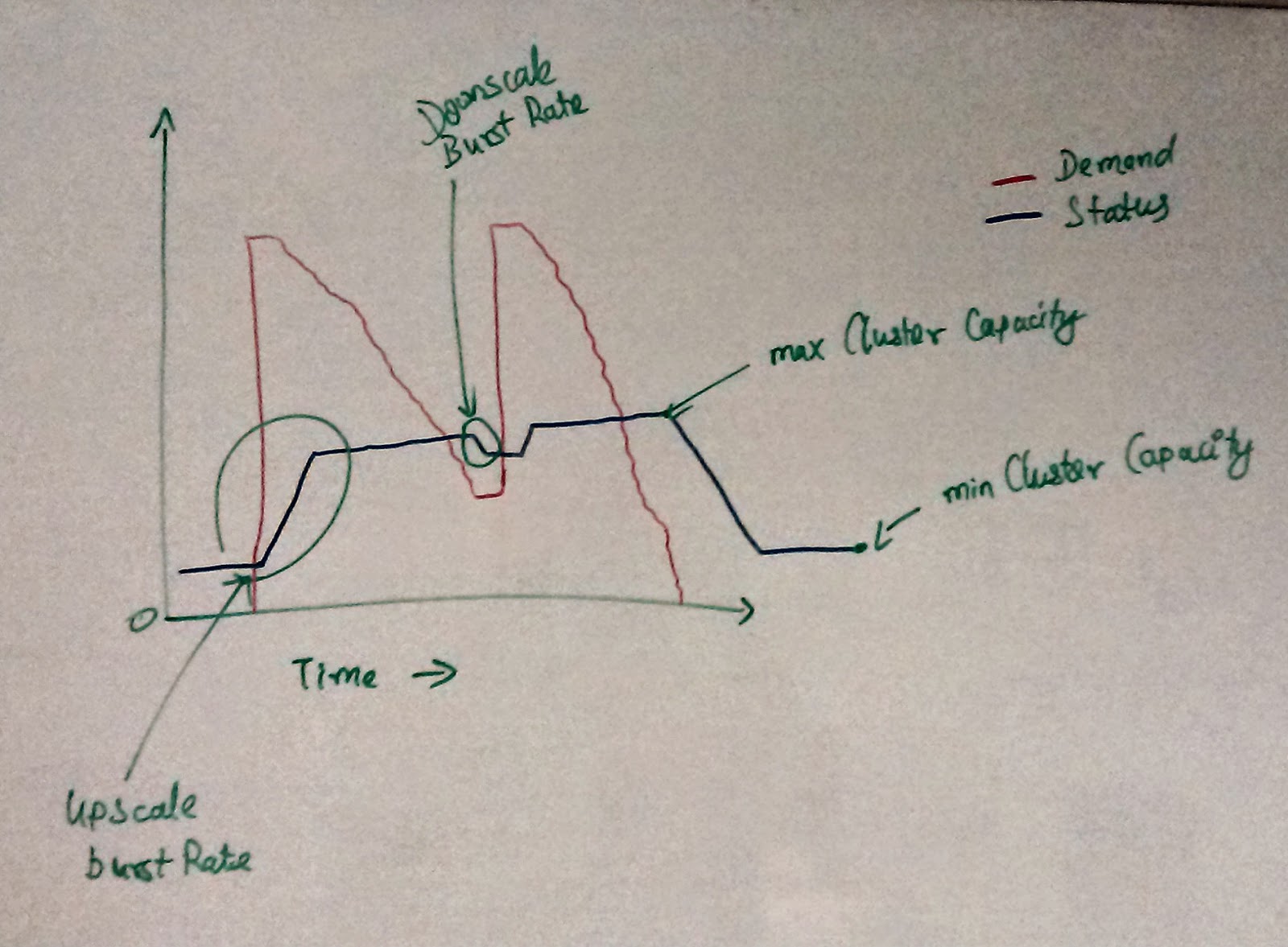
Everybody today uses Hadoop + some more of its ecosystem tools. Let it be Hive / HBase etc. I have been using Hadoop for writing production code from 2012 and for experiments much earlier than that. One thing that I don't see it anywhere is the ability to autoscale the Hadoop cluster elastically. Unlike scaling web servers having all map and reduce tasks full doesn't necessarily translate to CPU / IO metrics spiking on the machines. 

Figure - Usage graph observed from a production cluster
hand drawn on white-board

On this front - Only Qubole guys have seem to have done some decent work. You should check out their platform if you haven't. It is really super cool. A lot of inspiration for this post have been from using them.

This is one of my hobby project attempt at building just the Autoscaling feature for Hadoop1 clusters if had been part of say Qubole team back in 2012.

In this blog post I talk about the implementation goals and/or hows building this as part of InMobi's HackDay 2015 (if I get through the selection) or go ahead and build it anyways on that weekend.

For every cluster you would need the following configuration settings

  • minNodes - Minimum # of TTs you would always want in the cluster.
  • maxNodes - Maximum # of TTs that your cluster would like to use at any point in time.
  • checkInterval - Time unit in seconds to check the cluster for compute demand (default - 60)
  • hustlePeriod - Time unit in seconds to monitor the demand before we go ahead with upscaling / downscaling the cluster. - (default - 600)
  • upscaleBurstRate - Rate at which you want to upscale based on the demand (default- 100%)
  • downscaleBurstRate - Rate at which you want to downscale (default - 25%)
  • mapsPerNode - # of map slots per TT  (default - based on the machine type)
  • reducersPerNode - # of reduce slots per TT (default - based on the machine type)
Assumptions
- All the nodes in the cluster are of same type and imageId - easier during upscaling / downscaling.
- All TTs will have Datanodes also along with it

Broad Goals
- Less / No manual intervention at all - We're talking about hands-free scaling and not one click scaling.
- Should have less / no changes in the framework - If we start making forks of Hadoop1 / Hadoop2 to support certain features for autoscaling then most likely we'll have a version lock which is not a pretty thing 1-2 years down the lane. 
- Should be configurable - For users willing to dive deeper for configuring their autoscaling they should have options to do that. Roughly translates to being all blue configurations having sensible defaults.  

Larger vision is to see if we can make the entire thing modular enough to support any type of scaling. 

Please do share your thoughts if you have any on the subject. 

Monday, March 11, 2013

HFileInputFormat for Bulk repair of HBase

Today something interesting happened to our HBase cluster, of around 1600 regions we currently hold some odd 400+ regions got their STARTKEY as '' (Empty Start Keys). We tired to do an Offline Meta Repair, but that kept failing saying "Multiple regions have the same startkey:".

Quick (Dirty) Fix
  1. Move those regions out of the /hbase/
  2. Now run offline meta repair on the existing data (this is optional, as in our case if your .META. table is screwed you might need to run this, else you might need to find and remove the entries out of .META. manually. I did not try this so, I am not going to dwell on this further) 
Now, write a simple MR job to process all those regions on a CF basis (per-CF) to export them as SequenceFiles and import them back again using the regular HBase Import (org.apache.hadoop.hbase.mapreduce.Import).

When writing the MR job, one thing you might need which is not available of the shelf is the HFileInputFormat. I found a scala version of it, which I ported to Java.


Also, I made some changes to the scala version to be usable on HBase 0.94.2 (tested version)


DISCLAIMER: The above solution was tested with HBase 0.94.2 and Hadoop 1.1.1 setup. 

Wednesday, December 5, 2012

Import selected rows into HBase from Export Backup

Taking full table backup of your HBase tables are quite natural, but when you want to import only selective rows out, it is not possible. So if your row keys have common substring, you can now selectively import the data from your Export output.

The above code was tested on Hadoop 1.0.1, HBase 0.92.1.

Monday, March 19, 2012

Fixing RHIPE socketConnection Error

Today I was working with RHIPE, testing another tool for working with R and Hadoop. When I installed the ProtoBuf 2.4.1 and RHIPE 0.66 and tried to run the test sample, I had the socketConnection problem while Rhipe library was trying to connect with the server that was started.

After some debugging I found out that, since I did not have localhost entry in my /etc/hosts but some custom mappings as per my env settings. Diving into R code I figured out that Line 25 points at "localhost" and all I had to do was to change it to 127.0.0.1 and re-install the Rhipe library.

I forked the project and modified it the code on https://github.com/ashwanthkumar/RHIPE. Need to give him a pull request after looking further into the code. 

Thursday, March 8, 2012

List of Hadoop Ecosystem Tools

Some time back there was a discussion on the Hadoop User mail list for the list of Hadoop ecosystem tools. I just thought I can put them together with a short description and links to their git repos or products page. If you find an error or feel I have missed out something let me know, I will update it.

Tools are in ascending order of their names.
  1. Ambari - Ambari is a monitoring, administration and lifecycle management project for Apache Hadoop™ clusters.
    Hadoop clusters require many inter-related components that must be installed, configured, and managed across the entire cluster. The set of components that are currently supported by Ambari includes: HBase, HCatalog, Hadoop HDFS, Hive, Hadoop MapReduce, Pig, Zookeeper. Visit their website for more information.
  2. Avro - Apache Avro is a data serialization system
    Avro provides:
    1. Rich data structures,
    2. A compact, fast
    3. binary data format,
    4. A container file, to store persistent data,
    5. Remote procedure call (RPC),
    6. Simple integration with dynamic languages.
      On the basis of working. It is similar to tools like Thrift or Protobuf but has its own edge as described on their documentation. Well basically to put it short it can be used for providing API like services that leverages Hadoop stack for performing some task.
  3. Bixo - Bixo is an open source web mining toolkit that runs as a series of Cascading pipes on top of Hadoop
    By building a customized Cascading pipe assembly, you can quickly create specialized web mining applications that are optimized for a particular use case. More information on their website.
  4. BookKeeper - BookKeeper is a system to reliably log streams of records
    It is designed to store write ahead logs, such as those found in database or database like applications. In fact, the Hadoop NameNode inspired BookKeeper. The NameNode logs changes to the in-memory namespace data structures to the local disk before they are applied in memory. However logging the changes locally means that if the NameNode fails the log will be inaccessible. We found that by using BookKeeper, the NameNode can log to distributed storage devices in a way that yields higher availability and performance. Although it was designed for the NameNode, BookKeeper can be used for any application that needs strong durability guarantees with high performance and has a single writer. More Info on their website.
  5. Cascading - Cascading is a Data Processing API, Process Planner, and Process Scheduler used for defining and executing complex, scale-free, and fault tolerant data processing workflows on an Apache Hadoop cluster. All without having to 'think' in MapReduce.
    Cascading is a thin Java library and API that sits on top of Hadoop's MapReduce layer and is executed from the command line like any other Hadoop application. Well more detailed documentation can be found on their website.
  6. Cascalog - Cascalog is a Clojure-based query language for Hadoop inspired by Datalog
    Cascalog is a fully-featured data processing and querying library for Clojure. The main use cases for Cascalog are processing "Big Data" on top of Hadoop or doing analysis on your local computer from the Clojure REPLCascalog is a replacement for tools like Pig, Hive, and Cascading.
    Cascalog operates at a significantly higher level of abstraction than a tool like SQL. More importantly, its tight integration with Clojure gives you the power to use abstraction and composition techniques with your data processing code just like you would with any other code. It's this latter point that sets Cascalog far above any other tool in terms of expressive power. General introduction here, and source code here.
  7. Chukwa - Chukwa is an open source data collection system for monitoring large distributed systems
    Chukwa is built on top of the Hadoop Distributed File System (HDFS) and Map/Reduce framework and inherits Hadoop’s scalability and robustness. Chukwa also includes a ?exible and powerful toolkit for displaying, monitoring and analyzing results to make the best use of the collected data. More information can be found here.
  8. Crunch - a Java library that aims to make writing, testing, and running MapReduce pipelines easy, efficient, and even fun. Crunch’s design is modeled after Google’s FlumeJava
    Crunch is a Java library for writing, testing, and running MapReduce pipelines, based on Google's FlumeJava. Its goal is to make pipelines that are composed of many user-defined functions simple to write, easy to test, and efficient to run. Excellent introduction here and Source code is here.
  9. Crux - Reporting tool built for HBase
    Crux is a reporting application for HBase, the Hadoop database. Crux helps to query and visualize data saved in HBase. General introduction can be found here and source code ishere.
  10. Elastic Map Reduce - web service that enables businesses, researchers, data analysts, and developers to easily and cost-effectively process vast amounts of data
    Amazon Elastic MapReduce utilizes a hosted Hadoop framework running on the web-scale infrastructure of Amazon Elastic Compute Cloud (Amazon EC2) and Amazon Simple Storage Service (Amazon S3). More information can be found on the AWS EMR page.
  11. Flume - distributed, reliable, and available service for efficiently collecting, aggregating, and moving large amounts of log data
    Its main goal is to deliver data from applications to Hadoop’s HDFS. It has a simple and flexible architecture based on streaming data flows. It is robust and fault tolerant with tunable reliability mechanisms and many failover and recovery mechanisms. The system is centrally managed and allows for intelligent dynamic management. It uses a simple extensible data model that allows for online analytic applications. More information can be found on their wiki and source code is here.
  12. Hadoop common - Hadoop Common is a set of utilities that support the Hadoop subprojects
    Hadoop Common is a set of utilities that support the Hadoop subprojects. Hadoop Common includes FileSystem, RPC, and serialization libraries. More info can be gathered here.
  13. Hama - distributed computing framework based on BSP (Bulk Synchronous Parallel) computing techniques for massive scientific computations
    It was inspired by Google's Pregel, but different in the sense that it's purely BSP and common model, not just for graph. More information can be found here.
  14. HBase - distributed scalable Big Data store
    HBase is the Hadoop database. Think of it as a distributed scalable Big Data store. HBase can be used when you need random, realtime read/write access to your Big Data. There is extensive resource on HBase Book.
  15. HCatalog - table and storage management service for data created using Apache Hadoop
    Apache HCatalog includes Providing a shared schema and data type mechanism, Providing a table abstraction so that users need not be concerned with where or how their data is stored, and Providing interoperability across data processing tools such as Pig, Map Reduce, Streaming, and Hive. More information can be found on their website.
  16. HDFS - primary storage system used by Hadoop applications
    The Hadoop Distributed File System (HDFS) is a distributed file system designed to run on commodity hardware. It has many similarities with existing distributed file systems. However, the differences from other distributed file systems are significant. HDFS is highly fault-tolerant and is designed to be deployed on low-cost hardware. HDFS provides high throughput access to application data and is suitable for applications that have large data sets. HDFS relaxes a few POSIX requirements to enable streaming access to file system data. HDFS was originally built as infrastructure for the Apache Nutch web search engine project. More information can be found on their website.
  17. HIHO: Hadoop In, Hadoop Out - Hadoop Data Integration, deduplication, incremental update and more
    Hadoop Data Integration with various databases, ftp servers, salesforce. Incremental update, dedup, append, merge your data on Hadoop. More information can be found on theirwebsite.
  18. Hive - data warehouse system for Hadoop that facilitates easy data summarization, ad-hoc queries, and the analysis of large datasets stored in Hadoop compatible file systems
    Hive provides a mechanism to project structure onto this data and query the data using a SQL-like language called HiveQL. At the same time this language also allows traditional map/reduce programmers to plug in their custom mappers and reducers when it is inconvenient or inefficient to express this logic in HiveQL. More information can be found on theirwebsite.
  19. Hoop - provides access to all Hadoop Distributed File System (HDFS) operations (read and write) over HTTP/S
    Hoop server is a full rewrite of Hadoop HDFS Proxy. Although it is similar to Hadoop HDFS Proxy (runs in a servlet-container, provides a REST API, pluggable authentication and authorization), Hoop server improves many of Hadoop HDFS Proxy shortcomings. More information can be found on their website.
  20. HUE (Hadoop User Environment) - browser-based desktop interface for interacting with Hadoop
    Hue is both a web UI for Hadoop and a framework to create interactive web applications. It features a FileBrowser for accessing HDFS, JobSub and JobBrowser applications for submitting and viewing MapReduce jobs, a Beeswax application for interacting with Hive. On top of that, the web frontend is mostly built from declarative widgets that require no JavaScript and are easy to learn. More information can be found on their git repo.
  21. Jaql - Query Language for JavaScript(r) Object Notation (JSON)
    Jaql is a query language designed for Javascript Object Notation (JSON), a data format that has become popular because of its simplicity and modeling flexibility. Jaql is primarily used to analyze large-scale semi-structured data. Core features include user extensibility and parallelism. In addition to modeling semi-structured data, JSON simplifies extensibility. Hadoop's Map-Reduce is used for parallelism. More information can be found on their code base.
  22. Lily - Lily is Smart Data, at Scale, made Easy
    It is the first data repository built from the ground up to bring Big Data / NOSQL technology into the hands of the enterprise application architect. More detailed information on theirwebsite.
  23. Mahout - machine learning library's goal is to build scalable machine learning libraries
    Scalable to reasonably large data sets. Our core algorithms for clustering, classfication and batch based collaborative filtering are implemented on top of Apache Hadoop using the map/reduce paradigm. However we do not restrict contributions to Hadoop based implementations: Contributions that run on a single node or on a non-Hadoop cluster are welcome as well. The core libraries are highly optimized to allow for good performance also for non-distributed algorithms. More information can be found here.
  24. Map Reduce - MapReduce is a programming model and software framework for writing applications that rapidly process vast amounts of data in parallel on large clusters of compute nodes
    Apache MapReduce job usually splits the input data-set into independent chunks which are processed by the map tasks in a completely parallel manner. The framework sorts the outputs of the maps, which are then input to the reduce tasks. Typically both the input and the output of the job are stored in a file-system. The framework takes care of scheduling tasks, monitoring them and re-executes the failed tasks. More detail tutorial with examples to run on top of Hadoop can be found here while the general introduction to Map Reduce can be looked upon in Google University.
  25. Nutch - open source Web crawler written in Java
    You have all the features you can expect from a web crawler. Now Nutch can be integrated with Hadoop, this resource can help you setting that up. More details of Nutch can be found on their website.
  26. Oozie - workflow/coordination service to manage data processing jobs for Apache Hadoop
    Oozie is an extensible, scalable and data-aware service to orchestrate dependencies between jobs running on Hadoop (including HDFS, Pig and MapReduce). Oozie is a lot of things, but being: A workflow solution for off Hadoop processing and Another query processing API, a la Cascading is not one of them. More useful information can be found on here and also here.
  27. Pangool -   low-level MapReduce API that aims to be a replacement for the Hadoop Java MR API
    By implementing an intermediate Tuple-based schema and configuring a Job conveniently, many of the accidental complexities that arise from using the Hadoop Java MapReduce API disappear
  28. Pig - platform for analyzing large data sets that consists of a high-level language for expressing data analysis programs
    The salient property of Pig programs is that their structure is amenable to substantial parallelization, which in turns enables them to handle very large data sets. At the present time, Pig's infrastructure layer consists of a compiler that produces sequences of Map-Reduce programs, for which large-scale parallel implementations already exist (e.g., the Hadoop subproject). More information can be found at Pig Home.
  29. PrestoDB - Presto is an open source distributed SQL query engine for running interactive analytic queries against data sources of all sizes ranging from gigabytes to petabytes. 
  30. Scalding - Scala API for Cascading
    Refere to Cascading for more information. More information of Scalding can be found here. Excellent tutorial can be found here to get face-to-face introduction to Scalding.
  31. Sqoop - tool designed for efficiently transferring bulk data between Apache Hadoop and structured datastores such as relational databases
    Wonderful documentation on Sqoop can be found on Cloudera, its creator. Also official website is here.
  32. Zookeeper - centralized service for maintaining configuration information, naming, providing distributed synchronization, and providing group services
    ZooKeeper is a centralized service for maintaining configuration information, naming, providing distributed synchronization, and providing group services. All of these kinds of services are used in some form or another by distributed applications. Each time they are implemented there is a lot of work that goes into fixing the bugs and race conditions that are inevitable. Because of the difficulty of implementing these kinds of services, applications initially usually skimp on them ,which make them brittle in the presence of change and difficult to manage. Even when done correctly, different implementations of these services lead to management complexity when the applications are deployed. More information can be found here.

Friday, March 2, 2012

Patching Hadoop to support RMR 1.2

Back in my work we were working on R and Hadoop using the RHadoop(RMR). The latest release of RMR v.1.2 (download) has quite a few interesting updates to it. See here for a complete overview.

One of our test Hadoop Cluster has 10+ nodes which runs on Hadoop 0.20-append version build specifically for HBase. When we upgraded our RMR package on the cluster with v1.2, we ran into multiple issues. This post is just a summary of my experience on how to patch the Hadoop 0.20.x versions to support RMR v1.2 right away. Hoping it might be helpful for others in the community who might encounter some problems.


  1. First and foremost thing is, when you upgrade the RMR version without patching your earlier Hadoop distribution then you are likely to end up in the error of org.apache.hadoop.contrib.streaming.AutoInputFormat. 
  2. So you can follow the instructions as specified in Dumdo's Wiki (https://github.com/klbostee/dumbo/wiki/Building-and-installing) to download the apply the required patches. 
  3. This should help you run your latest R codes on the Hadoop cluster. Still you can't use the "combine" parameter if you are using earlier version of hadoop-0.20.203. In which case you might also need HADOOP-4842 patch. 
These are the in general very broad steps involved in building the patched version of the Hadoop. 

When you try to manage over a large cluster (I am not talking about me), over 40,50 machines building on all the systems is a waste of time and you generally need to have your Hadoop stack brought down. So what I suggest you is, download a local copy of the Hadoop version you are using right now. 

You can either download them from the Hadoop releases or checkout from source code, assuming you already dont have a custom built version of Hadoop. 

Apply the patches on the local copy (you don't need to edit any configurations or change any parameters). Just apply the patches and build the Hadoop source. Once you apply these patches and build the source code you need to replace only one single JAR file in your production cluster, which is $HADOOP_HOME/contrib/streaming/hadoop*streaming*.jar. All the patches deal only with the Hadoop Streaming only. But do realize you need to build the JAR for your version. 

I just wrote a small ant build script that can aid in doing the above process. Which tries to do the above process in an automated way. 


PS: Though I have tested the code, still try this at your own risk. 

Saturday, February 25, 2012

Hadoop AutoKill Hack

February's Hack! As you might have already known that I am working on Big Data, and by De facto we all use Hadoop eco-system to get things done. On the same page, I was just looking into some Hadoop Java API the other day to see how well I can get to see somethings happening under the hood.

More specifically I was trying to use JobClient class to see if I can build some custom client or an interface to the Hadoop Jobs we run on our cluster. During which I thought, can I add custom Job Timeout feature to Hadoop.

Problem Statement: I want to kill any job that runs beyond T time units in Hadoop and how do I do it? 

So I started writing custom client which can interact with the JobTracker to get the list of running jobs, and how long they have been running. If they exceed my given threshold time limit I would want to kill them. That is the overall concept, and I guess what I built it. API is so simple and straight forward, all it took was less than an hour to look into the jobdetails.jsp and see how to access the Jobs from the JobTracker and display the start time.

However the tricky thing was how to run the damn thing. I always got the "IOException: Broken Pipe" error. Then finally got the way we need to access it, was through running it as

$ hadoop jar JARName.jar

So, yeah I wrote a small hack for this. You can find it on my Git (https://github.com/ashwanthkumar/hadoop-autokill).

Wednesday, July 28, 2010

Hadoop Cluster Deployment + Step-By-Step Process

I've successfully deployed a small cluster of 3 nodes on Hadoop platform. I mark this as the 1st success towards the long road for Research Engine. It took me a while to understand the basics (since this is the 1st time) but it was such a wonderful experience.

The Cluster Specs're:
  1. Core - Ubuntu 10.04 - 2 GB RAM
  2. Core - Ubuntu 9.04 - 1 GB RAM
  3. Virtual PC (VBox 3.2.4) - Ubuntu 10.04 - 512 MB RAM. (Host is 1 machine)

Tests: Grep for Map/Reduce, Content Duplication by going on a copy of 500 MB replicated over 2 nodes.

Info: 1 NameNode, 1 DataNode, and 1 JobTracker


Below is the Step-by-Step procedure to deploy a Hadoop Cluster (for Learning purposes only. This can't be used as such in production environment. Please refer to Official Docs, and latest release for that). See the disclaimer on the bottom before even you start reading beyond this.
  1. In this steps, i shall assume you've 3 -4 systems, on a network and each of them running on Ubuntu 9.04+ with sun-java6-jdk and ssh packages installed. Its preferable to use a new system installation, though its not mandatory.
  2. Due to some issues with Hadoop 0.20.* (latest stable as of writing this post) we shall now (currently) use Hadoop 0.19.2 (stable). You can get a copy of yours from: http://apache.imghat.com/hadoop/core/hadoop-0.19.2/hadoop-0.19.2.tar.gz (53 MB).
  3. Create a new user for Hadoop work. This step is optional. Its recommened, as the path HADOOP_HOME is the same in the cluster.
  4. Extract the hadoop distribution on your home folder (u can extract it anywhere though). So, your HADOOP_HOME will be like: /home/yourname/hadoop-0.19.2
  5. Now, repeat the steps in all the nodes. (make sure the HADOOP_HOME) is the same on all the nodes.
  6. We need the IPs of all the 3 nodes. Let them be: 192.168.1.5, 192.168.1.6, 192.168.1.7. Where *.1.5 is the NameNode, *.1.6 is the JobTracker, these 2 are the main exclusive servers. You can find more info regarding them here (http://hadoop.apache.org/common/docs/r0.19.2/cluster_setup.html#Installation). Node *.1.7 is the DataNode, which is used for both Task Tracking and storing Data.
  7. U'll find a file called: "hadoop-site.xml" under the conf directory of the Hadoop distribution. Copy and paste the following contents between <configuration> </configuration>
    <property>
    <name>fs.default.name</name>
    <!-- IP Of the NameNode -->
    <value>hdfs://192.168.1.5:9090</value>
    <description></description>
    </property>

    <property>
    <name>mapred.job.tracker</name>
    <!-- IP of the JobTracker -->
    <value>192.168.1.6:9050</value>
    <description></description>
    </property><property>
    </property>
  8. Make sure the same is done for all the nodes in the system.
  9. Now, to create the Slaves for the NameNode to replicate the data. Go the HADOOP_HOME directory in the NameNode. Under the folder "conf" you should see a file called slaves.
  10. Upon opening slaves, you should see a line with "localhost". Add the IPs of all the DataNodes you wish to connect to the cluster here, one per line. Sample Slaves will be as follows:

    localhost
    192.168.1.7

  11. Now, its time to kick-start our cluster.
  12. Open terminal in the NameNode, go to HADOOP_HOME.
  13. Execute the following commands:

    # Format the HDFS in the namenode
    $ bin/hadoop namenode -format

    # Start the Distributed File System service on the NameNode, which will ask you the passwords for itself and All the slaves, to connect via SSH
    $ bin/start-dfs.sh
  14. Your NameNode should start and be running. To check the nodes connected to your cluster, go to step 19 and come back.
  15. Now, its the JobTracker Node. Execute the following commands:

    # Start the Map/Reduce service on the JobTracker
    $ bin/start-mapred.sh
  16. The same process follows for JobTracker. It asks all the password for itself and all its slaves (did i tell u, u can also add slaves to JobTracker?. Its the same process as NameNode, just add the IPs to the slaves file of JobTracker Node's Hadoop distribution), to start the Map/Reduce service.
  17. Now, that we're done starting the cluster. Its time to check it out!
  18. In the NameNode execute the following command:

    # Copy a folder (conf) to HDFS - For sample purpose
    $ bin/hadoop fs -put conf input
  19. If you go to http://192.168.1.5:50070, on your browser. U should see the Hadoop HDFS Admin interface. Its a simple interface created to meet the purpose. It shows you the Cluster Summary, Live and Dead Nodes etc.
  20. U can browse the HDFS using Browse the filesystem link on the top-left corner.
  21. Go, to http://192.168.1.6:50030, to view the Hadoop Map/Reduce Admin Interface. It displays the current jobs, finished jobs etc.
  22. Now, its time to check the Map/Reduce Process. Execute the following:

    # Default example code comes along with the distro.
    $ bin/hadoop jar hadoop-*-examples.jar grep conf output 'dfs[a-z.]+'
References:


Disclaimer: This is for my future reference. I don't take any responsibility over physical/mental/any other type of damage that may arise on following the above said process.